
Digital estate planning means listing your online accounts, devices and crypto, deciding what happens to each one, and giving your executor legal authority and practical access to carry out those wishes. In Canada, you do this through an inventory kept apart from your passwords, clear instructions in or alongside your will, and a trusted person who knows where to look. Without it, your family can lose photos, money and months of time.
TL;DR
- Make an inventory of devices and accounts, and keep passwords in a separate, protected place.
- Write a memorandum of wishes saying what to keep, transfer or delete, and add a digital-asset clause to your will.
- Crypto is the highest-risk item: lose the private key and the funds are gone.
- A “digital will” can mean an electronic will (valid in some provinces) or a regular will with digital instructions. They are not the same thing.
- Business owners need a separate plan for licences, accounts, access roles and backups.
Table of Contents
- What counts as a digital asset
- Why it matters for your executor
- Build your digital inventory in five steps
- Write down what you want: the memorandum of wishes
- Is a “digital will” valid in Canada?
- Provincial rules: what varies across Canada
- Cryptocurrency and private keys
- Business owners: your digital estate is bigger
- Perspective
- Put it together with your wider plan
- How we can help
- FAQ
- Sources
What counts as a digital asset
The Canadian Bar Association’s practitioner guide describes a digital asset as a record created, recorded, transmitted or stored in digital or other intangible form. The guide treats the underlying asset or liability as a separate matter, unless it is itself an electronic record. A bank balance is money. The online banking login is the digital door to it.
In practice, most Canadians hold digital assets in four groups:
- Devices: phones, laptops, tablets, external drives, and the software needed to open what is stored on them.
- Online accounts: email, cloud storage, social media, streaming and subscription services, online banking and investment platforms.
- Stored content: photos, videos, messages, tax records, documents and spreadsheets.
- Crypto and tokens: wallets, exchange accounts and NFTs. The federal Office of the Superintendent of Bankruptcy treats cryptocurrencies, digital tokens and NFTs as intangible assets that must be disclosed in a bankruptcy. That is a good signal that they are real property with real value.
Some of these have money value (crypto, a business domain name, an online brokerage account). Others have sentimental value (family photos). Others are mainly a security risk if left open (an old email account that resets every other password you have). A good plan covers all three.
Why it matters for your executor
Digital assets are part of the estate, and your executor is responsible for securing them. A Canadian guide on electronic wills notes that social media, crypto wallets and online banking belong to the estate and recommends specific digital-asset clauses in a will.
The legal side is less tidy than most people expect. The Uniform Law Conference of Canada’s 2016 model act says that a fiduciary’s ordinary powers extend to digital assets without changing who owns them. It also says a personal representative generally has access to a deceased person’s digital assets unless the person expressly indicated otherwise. That access still sits beneath the will, court orders, other laws and certain service-contract restrictions you have affirmatively accepted.
The practical problem is that companies set their own rules. The Alberta Law Reform Institute points out that fiduciaries often have legal authority but run into restrictive service agreements, which is why it argues for legislative updates. Your best defence is to leave your executor both the authority and the information.
If your executor is new to the job, our one-page executor checklist shows what to do before distributing anything, and our guide to probate in Canada explains the court process that usually follows.
Build your digital inventory in five steps
The Canadian Bar Association guide recommends an inventory of devices, online accounts grouped by category, important stored information and the software needed to access it. Here is a workable way to do it in one afternoon.
- List your devices. Note what each one is, where it lives and how it unlocks. Include old phones and drives that still hold data.
- List your accounts by category. Use groups such as financial, email, cloud storage, social media, subscriptions, work and crypto.
- Record the details for each account. A Canadian digital-legacy resource suggests noting the website, the associated email, any third-party authentication, payment status, other authorized users and the action you want taken.
- Keep passwords somewhere else. The same resource advises storing passwords separately in a password manager or protected location. If the inventory is found, it should not also be a key to everything.
- Review it once a year. Accounts change faster than wills do. Put a reminder on the same day you review your insurance beneficiaries.
Splitting the inventory from the credentials and from the instructions matters. It limits the damage if one document leaks, and it removes doubt about whether an account should be kept, transferred, memorialized or deleted.
A simple inventory template
| Account | Category | Linked email | Two-step login | Paid? | Your wish |
|---|---|---|---|---|---|
| Main email | (itself) | Phone app | No | Transfer access to executor, then close | |
| Cloud photo storage | Stored content | Main email | Phone | Yes | Download to a drive, give copies to family |
| Online brokerage | Financial | Main email | Phone app | No | Executor to handle with the estate lawyer |
| Business accounting software | Business | Work email | Phone app | Yes | Hand over to business partner |
| Social media | Social | Main email | Phone | No | Memorialize or delete |
Your own table will be longer. Keep it plain and factual.
Write down what you want: the memorandum of wishes
An inventory tells your executor what exists. A memorandum of wishes tells them what to do. The Canadian Bar Association guide recommends one that states what should be preserved, transferred or deleted.
Be specific. “Handle my accounts” is not an instruction. “Give my daughter the photo library, delete my social media, and let my brother close my streaming subscriptions” is. A few matters to settle:
- Who may read private messages? Decide this on purpose rather than leaving the executor to guess.
- Which content must be preserved? The same guide recommends regularly downloading or backing up photos, messages and videos, because some cloud services can make later recovery difficult.
- Who gets what? Family photos might go to one person and financial records to the executor.
The memorandum should sit next to your will, and the will should refer to it and include a digital-asset clause. A lawyer can word that clause for your province.
Check the platform’s terms
One warning is easy to miss. The Canadian Bar Association guide cautions that a password manager or credential list must comply with the service provider’s terms, because some terms prohibit access by anyone other than the account holder unless authorization is clear. Many major platforms offer their own legacy or memorialization settings. Switching those on, where available, is often the cleanest way to authorize someone.
Is a “digital will” valid in Canada?
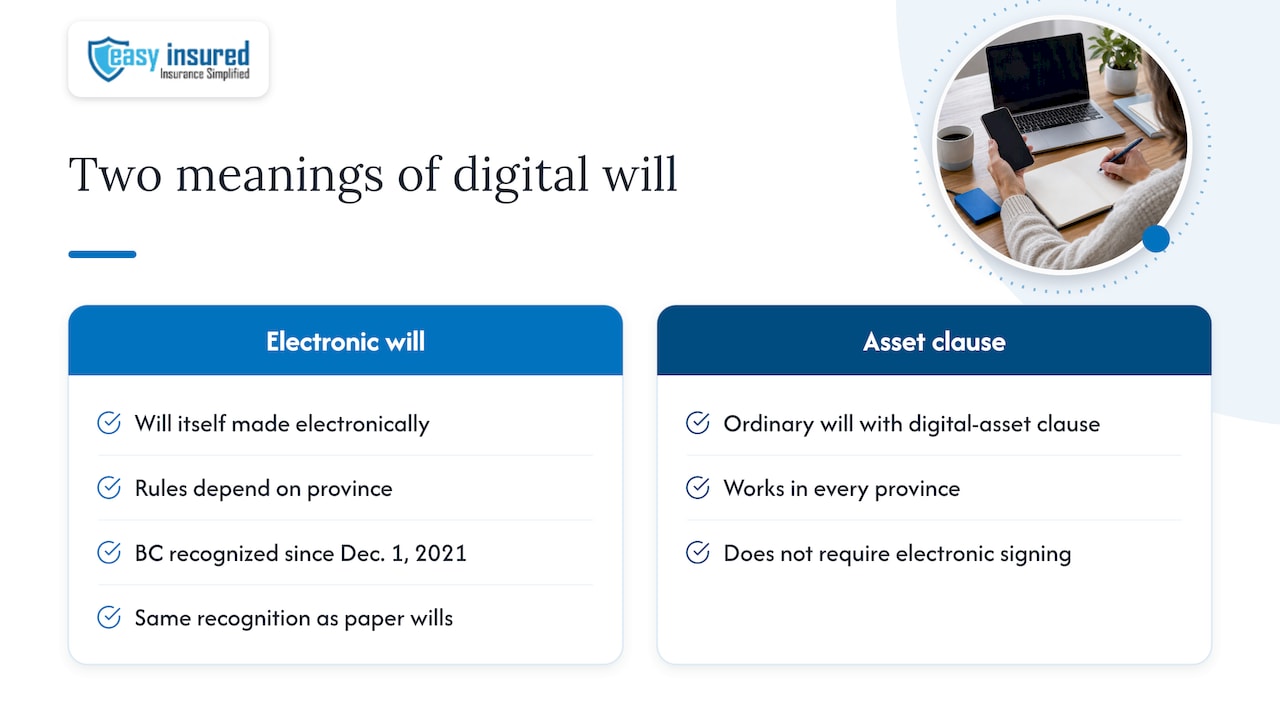
People use “digital will” for two different things.
An electronic will is the will itself made, signed, witnessed or stored in electronic form. Rules depend on the province. British Columbia’s Wills, Estates and Succession Act has recognized electronic wills since December 1, 2021, with the same legal recognition as paper wills, including virtual witnessing, digital signing and electronic storage. The Uniform Law Conference of Canada has also developed amendments to the Uniform Wills Act to accommodate electronic wills. They generally keep the traditional formalities of writing, signature and witnesses, adapted to an electronic medium.
A will with digital-asset instructions is an ordinary will that includes a clause on how your digital property should be managed. This works in every province and does not depend on electronic signing.
If you live outside BC, do not assume an online will you typed and saved is valid. Ask a lawyer in your province what the current rules for electronic execution are. Our estate planning checklist lists the documents that prevent delays, and our guide on how to avoid probate covers the structures that sit alongside a will.
Provincial rules: what varies across Canada
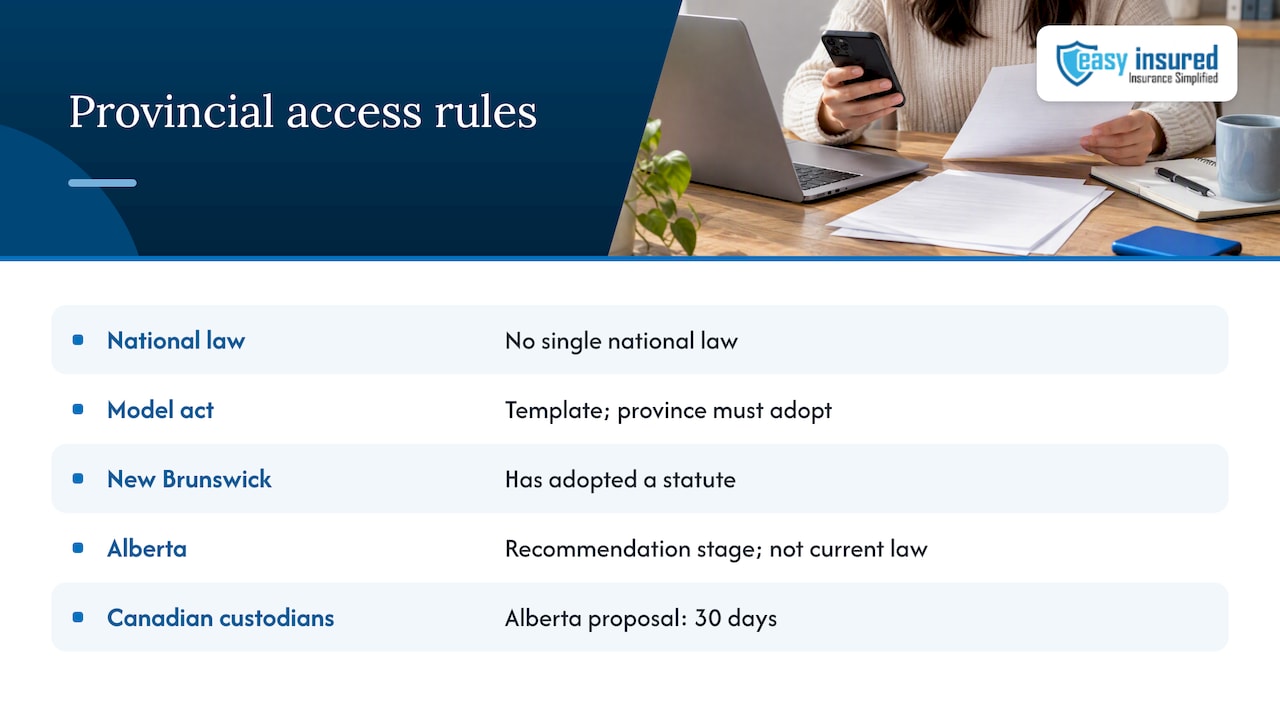
There is no single national law on fiduciary access to digital assets. The Uniform Law Conference of Canada’s model act is a template, and its provisions refer to an enacting jurisdiction and remain subject to that jurisdiction’s laws. A province has to adopt it first.
New Brunswick is a clear example of adoption. Its statute applies to fiduciaries including personal representatives, attorneys for property, representatives and trustees, and defines a digital asset as a digitally created, recorded, transmitted or stored record.
Alberta is still in the recommendation stage. The Alberta Law Reform Institute’s March 2024 report recommends a custodian-access regime with written proof of identity and authority, and proposed response periods of 30 days for Canadian custodians and 60 days for international ones. That is a proposal, not current Alberta law. The same report says its regime would not cover non-custodial blockchain assets such as cryptocurrency and NFTs, because there may be no identifiable custodian that a court can compel.
What this means for you: plan as if no law will do the work. Authorize your executor in your will, put the information in their hands, and have a lawyer in your province confirm what applies.
Cryptocurrency and private keys
Crypto breaks the usual pattern. There is often no company to call. The Financial Consumer Agency of Canada explains that a wallet’s public key identifies the wallet and receives assets, while the private key authorizes access and sending. Lose the private key and you lose access to the wallet and the funds. An executor cannot fix that with a death certificate.
The agency also recommends keeping wallets and backups safe, never sharing the private key, using encryption and strong passwords, and securing copies and online backups. FINTRAC’s guidance adds a useful point: it defines virtual currency as a digital representation of value, or the private key that enables access to it. The key is the asset in practical terms.
A sensible crypto plan has these parts:
- A holdings list with no secrets in it: which exchanges, which wallets, roughly what you hold and where recovery information is kept.
- A separate, secure location for keys or recovery phrases, such as a safe or safety deposit box, with your executor and lawyer told how to reach it.
- Instructions for exchange accounts, which have a custodian and can often be handled through the platform’s deceased-account process.
- A habit of keeping the list current. A crypto portfolio checklist is a handy way to track what you hold across wallets and exchanges, so your inventory stays accurate.
Do not write the private key in your will. A will can become a public court record during probate, which means anything written in it may be seen by others.
Business owners: your digital estate is bigger
If you run a company, your digital footprint includes customer data, accounting systems, domain names, software licences and shared logins. The Government of Canada’s small business guide recommends that owners inventory devices, software licences and online accounts, define access roles, and plan backups and incident recovery. That same list works as a succession tool.
Ask yourself:
- Who besides you can log in to the domain registrar, payment processor and accounting software?
- Where are the backups, and can someone else restore them?
- Which accounts are in your personal name rather than the company’s?
- Does your shareholder agreement or succession plan mention digital access?
For the wider ownership picture, see our guide to an estate freeze for business owners. If your business depends on you personally, it is also worth reviewing business insurance and group insurance plans, so the company can carry on while access is being sorted out.
Perspective
Most of the estate files we see are built around the big, visible items: the house, the life insurance, the registered accounts. The digital layer is usually missing, and it is the part a family runs into first. Within days they need an email account, a phone, a bank login.
Our view is that a digital plan belongs inside the financial plan, not beside it. The inventory tells your executor what exists. Your insurance and registered-account beneficiaries pay out outside probate, so the family has cash while the digital side is being sorted. Our approach to planning is to keep everything in plain language, with a certified financial planner to explain it, so the plan gets done and stays current.
If you do one thing this month, write the inventory and name the person who will read it.
Frank
Put it together with your wider plan
A digital plan works best when the rest of your estate is in order. Beneficiary designations on life insurance and registered plans, such as a TFSA with a successor holder, pass outside the will, as our guide to TFSA succession explains. Trusts can add control, and our article on inter vivos and testamentary trusts covers the tax timing. For the tax side more broadly, read about strategies to reduce estate taxes.
How we can help
Easy Insured works with Canadian families and business owners on estate planning, life insurance and financial planning. Our services include estate planning and related financial planning, and we offer life, disability, critical illness and final expense coverage that can fund the plan you build.

If you want your digital inventory, beneficiaries and insurance to work together, you can start with our financial planning page and talk to a certified financial planner. For the cash your family may need quickly, look at final expense insurance or term life.
FAQ
Can my executor just log in to my accounts?
Not necessarily. An executor generally has authority over your digital assets under the model act unless you indicated otherwise, but access is still subject to your will, court orders and the service terms you accepted. Leave written authorization and use any legacy tools the platform offers.
Is a digital will legal in Canada?
It depends on what you mean and on your province. British Columbia has recognized electronic wills since December 1, 2021. Elsewhere, a conventional will with a digital-asset clause is the safer route. Confirm the current rules with a lawyer in your province.
Should I put my passwords in my will?
No. Wills can become public during probate, and passwords change often. Keep passwords in a password manager or another protected place, and let the will point your executor to it. Check that this is allowed under each platform’s terms.
What happens to my cryptocurrency if I die?
If nobody has the private key, the funds can be permanently inaccessible. The Financial Consumer Agency of Canada says losing the key means losing access. Plan secure storage of keys and tell your executor and lawyer how to retrieve them.
Sources
- Digital Assets: Practitioner’s Guide Canada (Canadian Bar Association)
- Guidance for Completing Form 79, Statement of Affairs (Office of the Superintendent of Bankruptcy)
- Electronic Wills and Digital Assets
- Uniform Access to Digital Assets by Fiduciaries Act (ULCC, 2016)
- Improving Access to Digital Assets After Death or Incapacity (Alberta Law Reform Institute)
- Access to Digital Assets (Alberta Law Reform Institute, March 2024)
- We Can Choose: Digital Legacy Planning
- Amendments Regarding Electronic Wills (ULCC)
- New Brunswick digital assets statute
- Crypto assets (Financial Consumer Agency of Canada)
- Reporting large virtual currency transactions (FINTRAC)
- Get Cyber Safe Guide for Small Businesses (Government of Canada)
- Crypto Portfolio Checklist